
Zillow: Homes for Sale & Rent
Zillow GroupHouse & Home
4.8175.38K Reviews
- Version
- 2026.80.1.135653
- Installs
- 50.00M
- Age Rating
- Everyone
Screenshots

Our Review of Zillow: Homes for Sale & Rent
 Analysis by Appyee
For me, a good home-search app should make it easier to compare possibilities, not convince me that every listing is a perfect opportunity. That balance matters whether I’m looking for somewhere to live, trying to understand rents in a new area, or simply checking how a neighborhood’s housing options differ. Zillow: Homes for Sale & Rent is a free House & Home app from Zillow, and its mix of search tools and saved listings gives me a practical place to start. I’d still treat an app as a research aid rather than a substitute for checking a property and its details carefully.
What free access means for a home search
The app is free to download, so I can explore its home-search tools without paying an upfront purchase price. That makes it easy to try while I’m only comparing neighborhoods, as well as when I have a more immediate reason to search. Free access is useful, but it doesn’t make a home affordable or settle the financial decisions involved in buying or renting. I’d keep those larger costs separate from the question of whether the app itself is worth using.
That distinction is especially helpful for casual browsing. I can use the app to get a feel for the kinds of listings I’m seeing, then return to a serious search when my budget, timing, or location is clearer. If I’m making a major housing decision, I’d also verify important listing details and financial assumptions before acting. The app can help me organize what to investigate; it can’t make the decision for me.
Using Zillow to make a more informed shortlist
When I first opened Zillow, I was pretty impressed by how intuitive the interface is. Right off the bat, you’re greeted with a search bar that lets you dive right into exploring homes. You can filter by location, price range, number of bedrooms, and even amenities like pools or fireplaces. The app makes it super easy to customize your search to find exactly what you’re looking for.
One feature I really love is the interactive map. By simply moving around the map, you can see different properties pop up with their prices and a quick snapshot. It's like going on a virtual house tour from the comfort of your couch. And if you’re someone who's always on the go, the app’s GPS functionality lets you find properties near your current location in a snap!
Build a shortlist before arranging visits
Another standout feature is the ability to save your favorite listings. You can create a list of properties you’re interested in and keep track of any changes in their status or price. Plus, Zillow sends you notifications if there’s a price drop or if a property you’ve saved is sold. It’s like having a personal real estate assistant in your pocket.
I find saved listings most useful when I’m comparing a few different areas rather than collecting every attractive home I see. A simple approach is to save only places that meet the same basic needs, then compare the trade-offs: location, price, room count, and the features that genuinely matter to me. That keeps a shortlist useful instead of turning it into an endless collection of possibilities. If a listing changes or disappears, I can use that as a prompt to revisit my priorities rather than assume the next option is automatically a better fit.
Notifications can help me notice changes without repeatedly checking each saved property. I’d treat them as reminders to review a listing, not as a reason to rush into a decision. A price change is one part of the picture, and a listing’s availability or details may need another look before I contact anyone or plan a visit. For someone searching across several neighborhoods, that small distinction can reduce both missed updates and impulsive reactions.
Look beyond the property itself
And here’s the kicker: Zillow also offers insights into the neighborhood. You can check out school ratings, crime rates, and even see what the commute would be like from your potential new home to work. It’s these little extras that make the app not just a tool for finding a house, but a complete guide to choosing the right home for your lifestyle.
I’d use those neighborhood details to generate better questions, not to make a final judgment from a screen. For example, if I’m considering a move, I can compare commute information and school details across areas, then investigate the parts that affect my own routine. A map can make two homes look close together while their day-to-day convenience differs, so it helps to think through where I actually travel and what I need nearby. These tools are most valuable as an early filter; a visit and local research still matter.
A realistic use case is a renter who works in one part of town but hopes to move closer to family. I’d search each area separately, use the filters to keep the options within my budget and room needs, and save a small group from each location. Then I’d compare the commute and neighborhood information before deciding which places are worth following up on. That workflow turns casual browsing into a manageable comparison without pretending that an app can tell me how a home feels in person.
Where it fits among other property apps
Now, I’ve tried a fair few real estate apps, and I have to say Zillow has a leg up when it comes to its extensive database. With millions of listings, including those that aren’t even on the market yet, you’re getting a comprehensive view of what’s out there. Plus, the app keeps you informed with housing market trends and forecasts, which is a big plus if you’re trying to time your purchase or sale just right.
Compared with checking property sites one at a time or relying on a single agent’s selection, Zillow is convenient for broad browsing and keeping possibilities together. Its map-based exploration is particularly handy when location is still flexible. But I wouldn’t assume one app shows every suitable property or that every displayed detail answers every question. If I’m searching in a particular area, checking another local listing source can be worthwhile, especially when the search is urgent or the available options seem limited. Zillow works best for me as a strong starting point, not the only window into a market.
The app is also useful before I’m ready to contact anyone. I can browse to learn what kinds of homes appear in a target area, narrow down my preferences, and keep notes mentally through a focused set of saved choices. That exploratory stage is a genuine use case, not wasted time—but it does have a limit. If I’m only daydreaming, frequent alerts or constant checking could make the search feel more urgent than it is. I’d save notifications for a search I actually intend to pursue.
Turn browsing into a realistic budget check
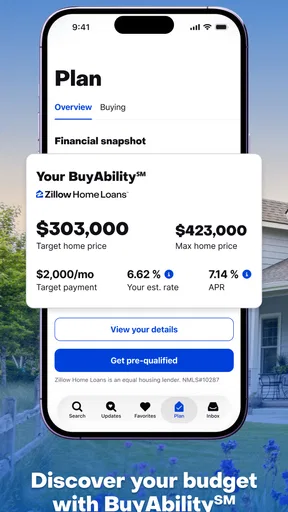
Another strong point is the mortgage calculator. It’s not only handy but crucial for anyone serious about buying. You can estimate your monthly payments and see how different down payments or interest rates affect your budget. It definitely takes a lot of guesswork out of financial planning.
I’d use the calculator to compare scenarios, rather than treating one estimate as a complete affordability answer. Changing the down payment or interest assumption can show how sensitive a monthly figure is to those inputs, which is useful when I’m deciding whether a listing belongs on my shortlist. The practical tip is to test a conservative scenario as well as the most optimistic one. An estimate can help me ask better questions, but I’d still want to account for the broader costs and personal circumstances involved in a purchase.
That makes the calculator more useful for early screening than for making a final commitment. If the payment estimate already feels uncomfortable under reasonable assumptions, I can avoid spending time pursuing a home that is unlikely to fit. If it looks manageable, I still need to confirm the numbers through appropriate financial guidance before making a decision. The tool helps organize thinking; it doesn’t replace a lender’s assessment or a full household budget.
Who is likely to get the most value
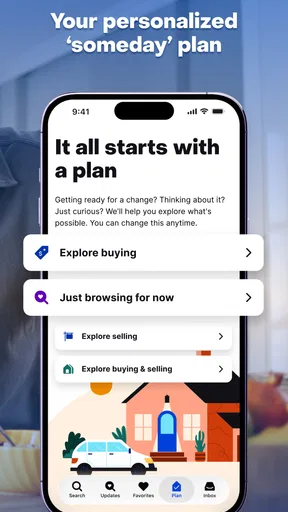
I’d recommend the app most to people who want one place to explore buying and renting possibilities, compare areas on a map, and keep track of a shortlist. It suits first-time searchers who need help turning a vague wish—more space, a shorter commute, a different neighborhood—into filters and concrete options. It can also help someone who is relocating and wants to learn the shape of a local market before arranging visits.
It may be less useful for someone who already has a narrow, time-sensitive search and depends on complete, current coverage of one specific local market. In that situation, I’d pair it with other local sources and direct follow-up rather than relying on a single feed. It’s also not the right tool if I want a definitive judgment about a home’s condition or whether an area will suit me. Those questions need evidence beyond listing snapshots and neighborhood summaries.
The app’s scale is part of its appeal: it has an average rating of 4.8 from around 1.5 million ratings, and it has been installed over 50 million times. It is rated for Everyone, which makes its intended audience broad, though the decisions people make with it can be anything but casual. Zillow’s long-running presence in the category gives it a familiar role for many searchers, but popularity alone wouldn’t make me skip careful checks or compare alternatives when the stakes are high.
What to expect from the app itself
Zillow was released on March 17, 2010, and its current version is 2025.53.0.98344, with Android 10 as the minimum operating-system requirement. Those details matter if I’m checking whether it fits an older device, while the free price makes trying it straightforward for people who meet that requirement. I’d still keep my expectations focused on what a property-search app can do: help me discover, compare, and track options, rather than complete every step of a housing transaction.
One question people often have is whether browsing is useful if they are not ready to move. In my view, yes, provided I use it intentionally. Looking at listings can clarify which features I care about and which compromises I’d accept. I’d avoid treating current asking prices or market trends as promises about what will happen later; they’re context for research, not a guarantee of future conditions.
Another natural question is whether the app can replace visiting a property. I wouldn’t rely on it for that. Search filters, photos, maps, and neighborhood information can help me decide what deserves attention, but they can’t reproduce the experience of checking a home’s layout, condition, and surroundings for myself. I’d use the app to reduce the number of possibilities I need to investigate, then verify the important details through direct follow-up.
My buy-or-skip verdict
So, is Zillow: Homes for Sale & Rent worth downloading? Absolutely! It’s a powerful, user-friendly app that brings the real estate market to your fingertips. Whether you’re actively looking to buy or rent, or just keeping an eye on the market, this app offers everything you need and more.
My recommendation comes with a practical boundary: download it if you want a free way to browse homes, use map-based discovery, and organize a shortlist. Skip it as your main solution if you need guaranteed coverage, a final assessment of a property, or a complete answer to whether you can afford a move. In those cases, the better choice is to combine property research with local sources, in-person checks, and appropriate financial advice. The app can make the search clearer, but it shouldn’t carry the whole decision.
In a world where property hunting can be overwhelming, Zillow makes the process not only manageable but enjoyable. So, go ahead and give it a try—I bet you’ll find yourself browsing homes even when you’re not really looking!
Privacy and Permissions
See what permissions an app requests and how it handles your data.
- Identity
- find accounts on the device
- Contacts
- find accounts on the device
- Location
- approximate location (network-based), precise location (GPS and network-based)
- Phone
- read phone status and identity
- Photos/Media/Files
- read the contents of your USB storage, modify or delete the contents of your USB storage
- Storage
- read the contents of your USB storage, modify or delete the contents of your USB storage
- Camera
- take pictures and videos
- Microphone
- record audio
- Wi-Fi connection information
- view Wi-Fi connections
- Device ID & call information
- read phone status and identity
- Other
- view network connections, pair with Bluetooth devices, change network connectivity, full network access, change your audio settings, run at startup, use accounts on the device, control vibration, prevent device from sleeping, read Google service configuration
Verdict
Strengths of Zillow: Homes for Sale & Rent
- User-friendly interface for easy navigation.
- Comprehensive property listings with updates.
- Advanced search filters for precise results.
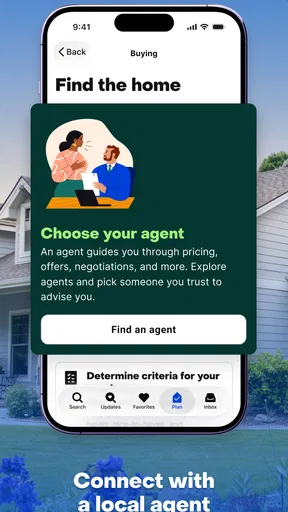
- In-app communication with agents and landlords.
- Detailed market trends and neighborhood info.
Limitations of Zillow: Homes for Sale & Rent
- Occasional inaccuracies in property details.
- Limited features in free version.
- Can be slow on older devices.
- Notifications can be overwhelming.
- Some areas lack detailed data.
Other Releases by Zillow Group
View All
Apartments & Rentals - Zillow
House & Home4.8

Zillow 3D Home Tours
House & Home3.9
Similar Picks in This Category
View All
Universal TV Remote Control
CodeMatics Media Solutions3.9

AlfredCamera Home Security app
Alfred Systems Inc.4.7

Planner 5D: AI Home Design
Planner 5D4.5

Universal Tv Remote-Cast to TV
One Music Player4.1

99acres Buy/Rent/Sell Property
infoedge.com4.3

Urban Company: InstaHelp &more
Urban Company4.8
You May Also Like
View All


Frequently Asked Questions
What features does Zillow offer for home buyers and renters?
Zillow provides a comprehensive platform for home buyers and renters, offering features like detailed property listings, high-resolution photos, and virtual tours. Users can filter searches by price, location, and amenities. The app also includes tools for mortgage calculations and neighborhood insights, helping users make informed decisions.
Is Zillow free to use, or are there any hidden costs?
Zillow is free to download and use for browsing listings and utilizing most of its features. However, certain premium services, like Zillow Offers, may involve additional costs. It's important to review any listings or service agreements closely to understand any potential fees associated with specific services.
How accurate are the property valuations on Zillow?
Zillow uses a proprietary algorithm to provide estimated home values called "Zestimates." While these estimates can be a helpful starting point, they may not always reflect the current market conditions or unique property features. For precise valuations, consulting a local real estate professional is recommended.
Can I contact real estate agents directly through Zillow?
Yes, Zillow allows users to connect directly with real estate agents through the app. You can request more information about a property, schedule a tour, or ask questions directly from the listing page. This feature facilitates easy communication and helps streamline the home-buying process.
How does Zillow protect user privacy and data security?
Zillow takes user privacy and data security seriously by implementing encryption and security protocols to protect personal information. The app collects data necessary for user functionality, but it is essential to review their privacy policy to understand how your data is used and shared. Always ensure your app is updated to benefit from the latest security features.
